
Skedular Teams

Workplace Management Software for Hybrid Teams

Help employees find the right place to work while giving workplace teams the visibility they need to coordinate attendance, manage space, and support hybrid work.

Workplace management is more than desk booking

Most workplace software focuses on booking desks and rooms. Modern organizations also need to understand who is coming to the office, how teams coordinate in person, how space is being used, and how workplace policies are being adopted.

See who is coming to the office

Help teams coordinate in-person work by knowing which colleagues will be onsite.

Understand how office space is being used

Track which desks and rooms are in demand and make better decisions about office layout.

Support hybrid work without spreadsheets

Manage flexible workplace policies and coordinate who comes to the office without manual tracking.

Give workplace teams the tools they need

Help facilities and workplace teams manage office resources without chasing spreadsheets.

How employees use Skedular Teams

1

Open Slack, Microsoft Teams, or Skedular

Employees access workplace tools from the applications they use daily.

2

View attendance and team presence

See who is coming to the office and plan accordingly.

3

Book workspace resources

Reserve desks, rooms, parking spaces, or equipment in seconds.

4

Find your space with maps

Use interactive floor plans to locate the right space.

5

Receive confirmation

Get booking confirmations and reminders automatically.

6

Arrive with confidence

Show up at the office knowing your workspace is ready.

7

Teams gain visibility

Workplace managers see attendance trends and utilization insights.

Everything needed to manage workplace coordination

Skedular Teams brings together desk booking, room reservations, attendance tracking, team coordination, and workplace visibility in one place.

Book the resources employees need

Make everyday workplace resources easier to find and reserve.

  • Desks
  • Meeting rooms
  • Parking spaces
  • Equipment

Help employees plan better office days

Help people plan office days with enough context to make the trip worthwhile.

  • See who is coming in
  • Interactive floor plans
  • Office maps
  • When space is available

Keep teams connected

Keep workspace activity close to the tools teams already use.

  • Slack
  • Microsoft Teams
  • Notifications
  • Team booking views

Built for workplace operations

Support organizations that need control, reporting, and identity-aware access.

  • Analytics
  • SSO
  • Permissions
  • Reporting

Why organizations choose Skedular Teams

One place for workplace coordination

Manage attendance, desks, rooms, and parking from one platform instead of juggling multiple tools.

Work where employees already work

Slack and Microsoft Teams integrations mean employees can book workspace without leaving the tools they use daily.

Built for hybrid work

Support flexible workplace policies and coordinate who comes to the office without manual spreadsheets.

Enterprise ready

SSO, permissions, and reporting built in for organizations that need control and security.

Interactive floor plans

Help employees find desks, rooms, parking spaces, and workplace resources visually.
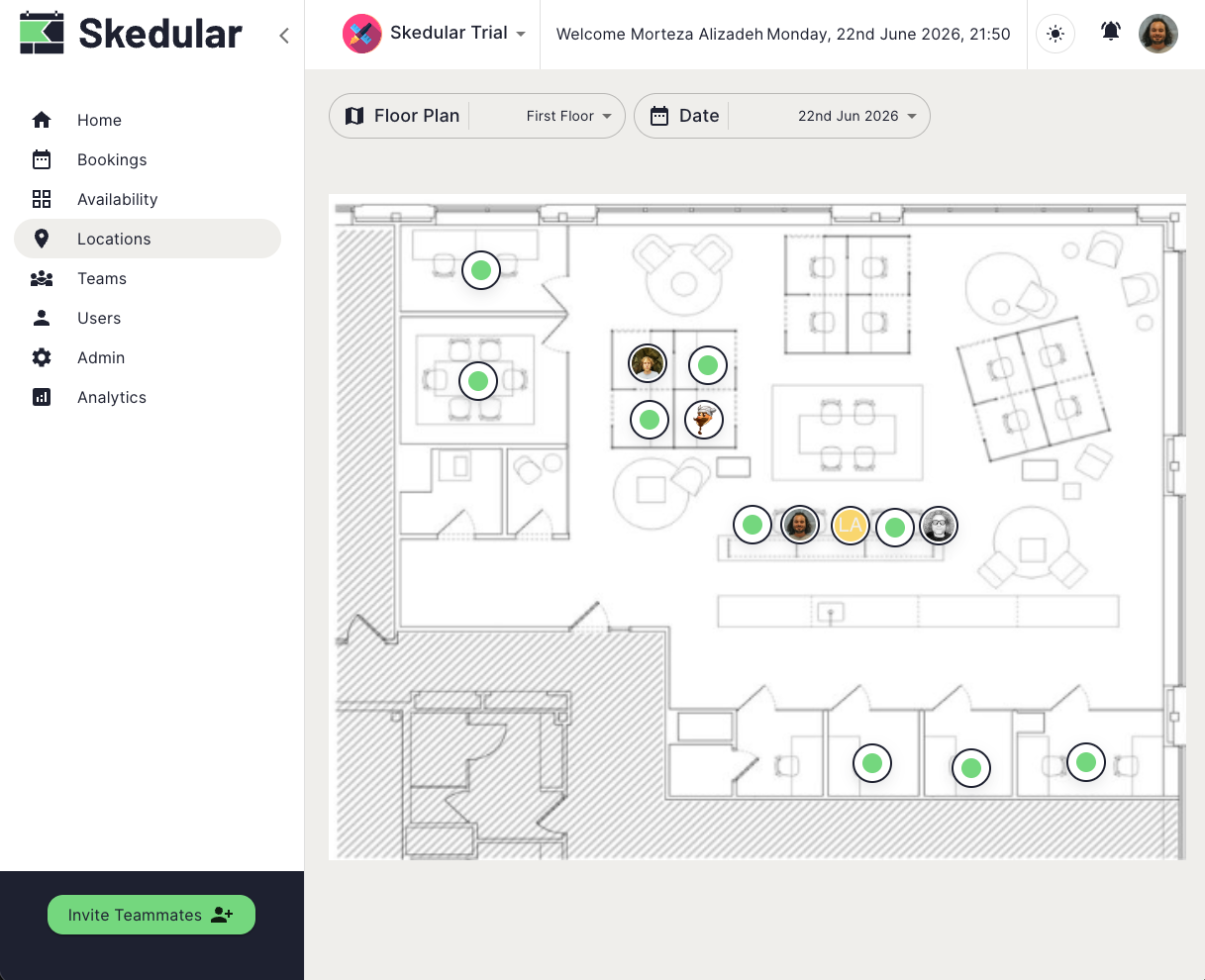
Interactive floor plans screenshot

Attendance and workplace visibility

Understand who is coming to the office and help teams coordinate in-person work.
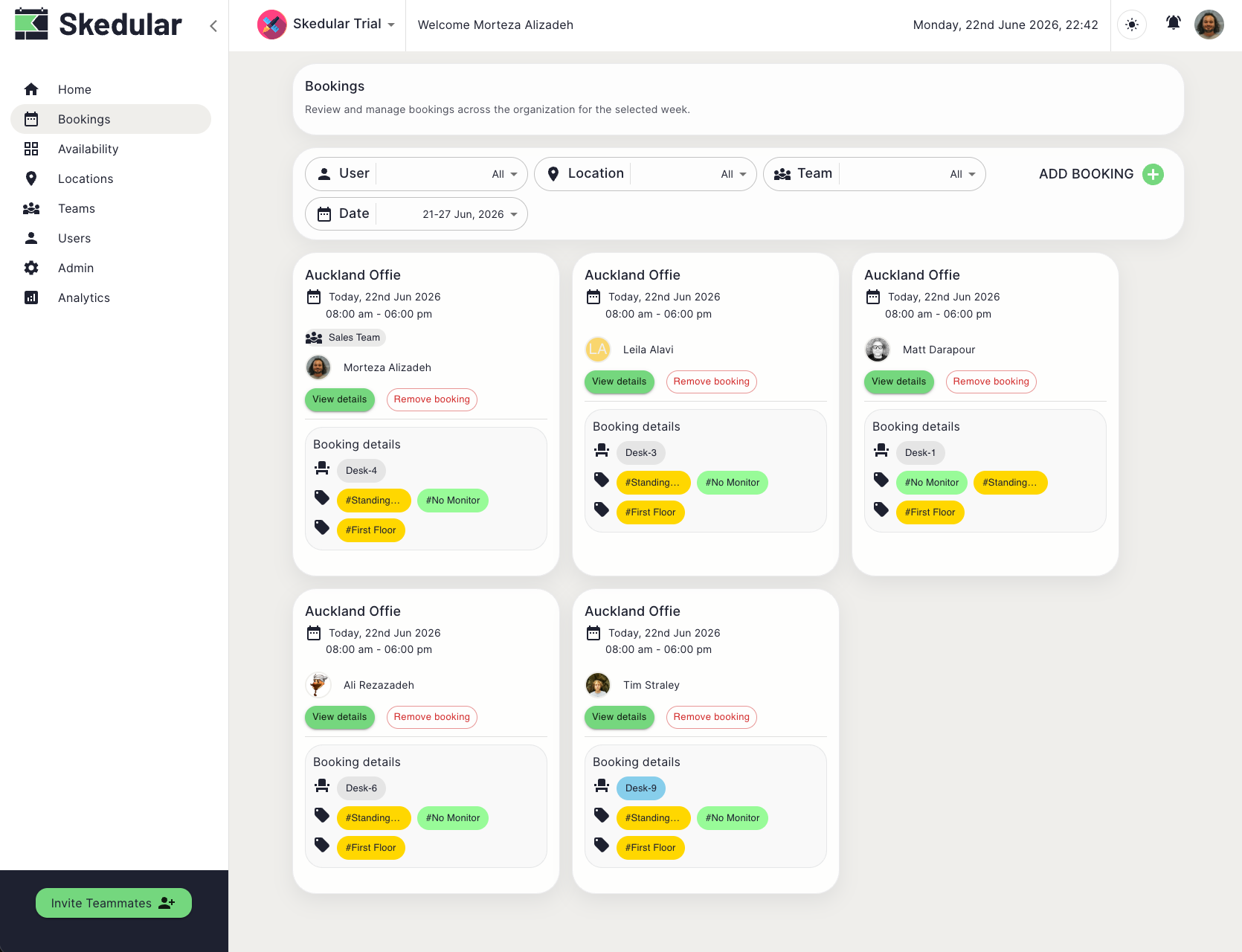
Attendance and workplace visibility screenshot

Desk and room booking

Book desks, rooms, parking, and equipment in seconds.
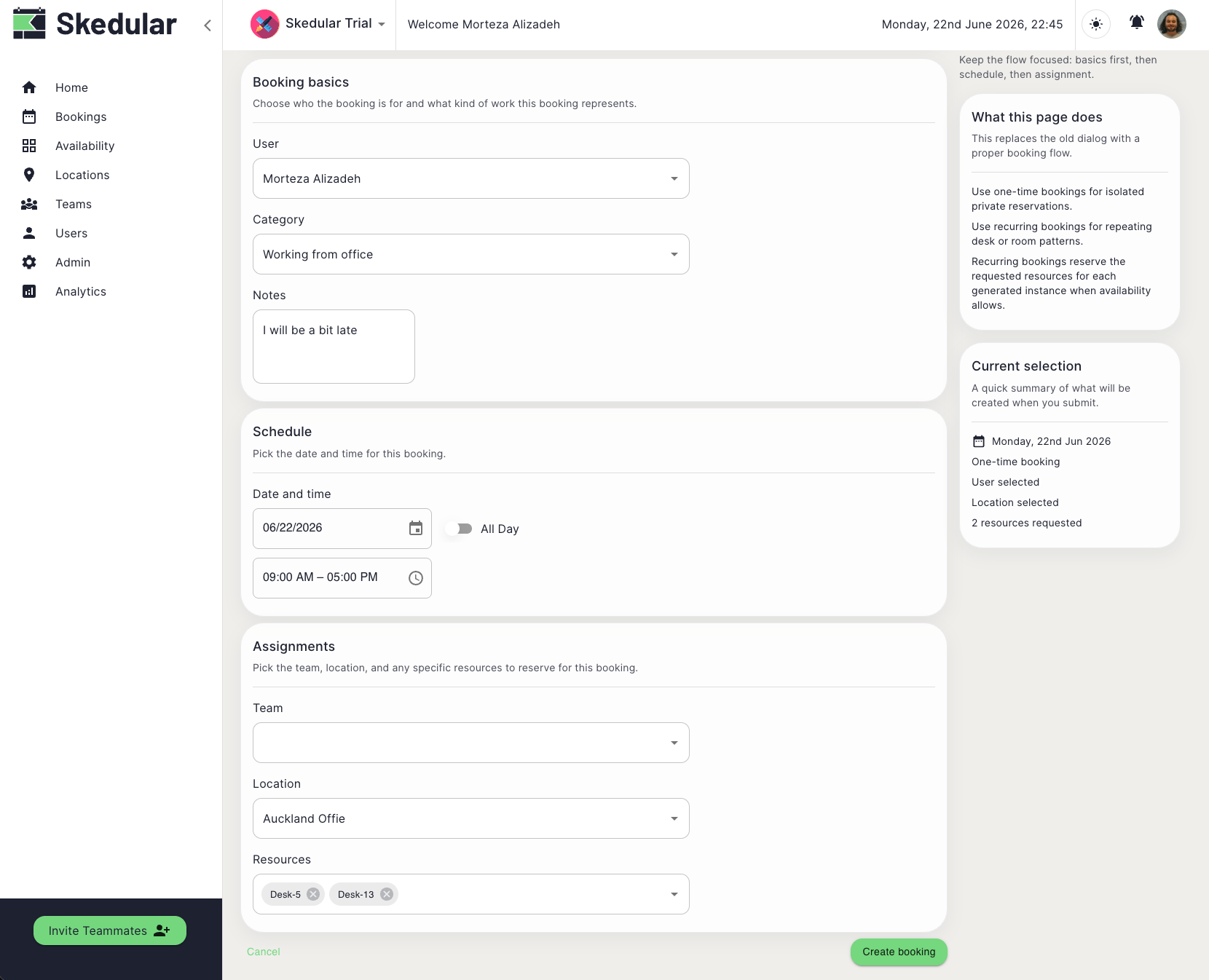
Desk and room booking screenshot

Workplace analytics

Track attendance, utilization, and workplace trends over time.
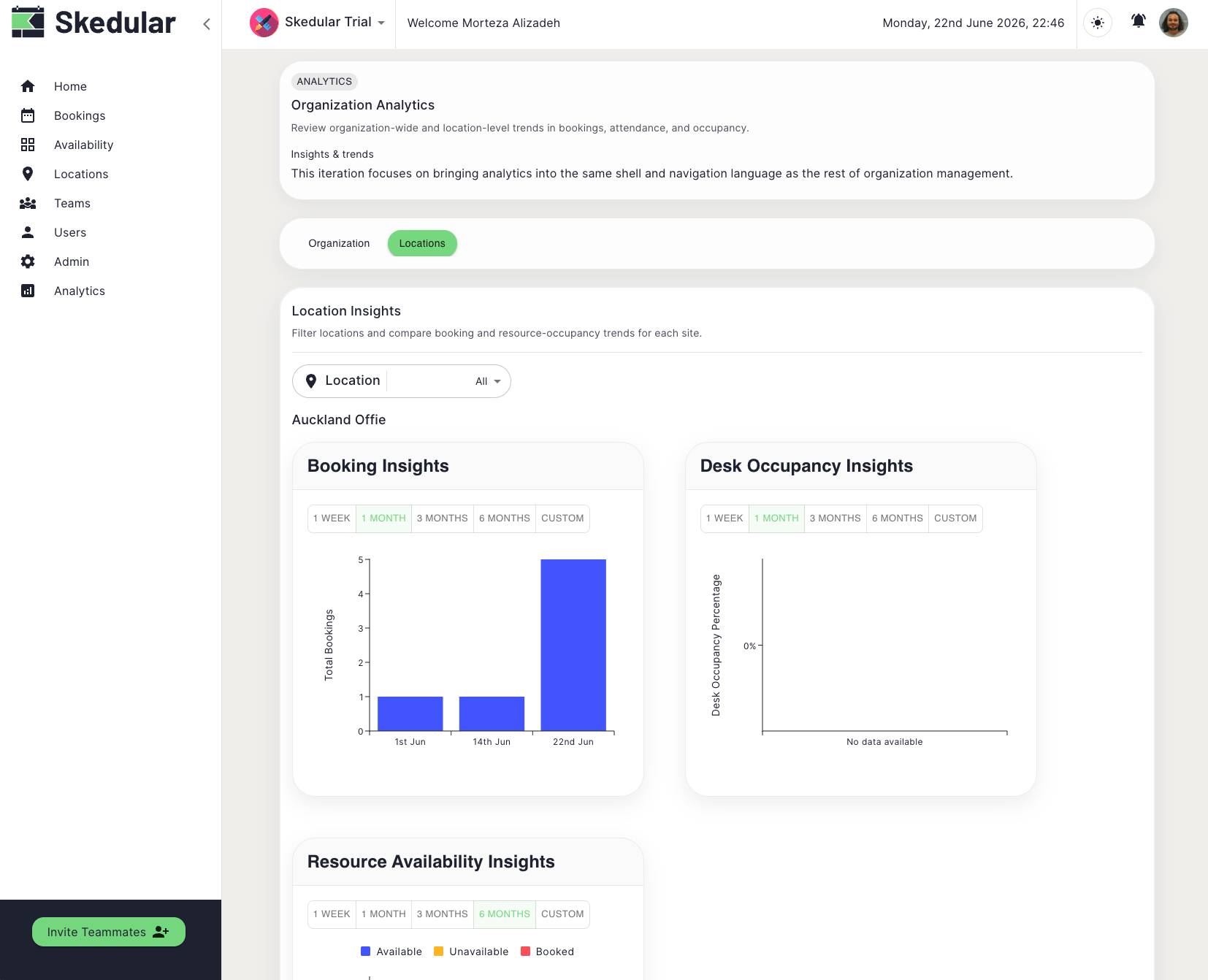
Workplace analytics screenshot

Connect with your workplace ecosystem

Integrate Skedular Teams with the tools your organization already relies on.

Slack
Microsoft Teams
Enterprise SSO

Built for modern organizations

Whether you're managing a corporate office, supporting hybrid work, coordinating facilities, or overseeing workplace operations, Skedular Teams helps bring workplace visibility and resource management together.

Enterprise organizationsCorporate officesGovernment departmentsFacilities teamsWorkplace managersExecutive assistantsHybrid work programsOperations teams

Work where your teams already work

Book desks, coordinate attendance, receive notifications, and stay informed without leaving Slack or Microsoft Teams. Skedular Teams integrates directly into the tools employees already use every day.

Trusted by workplace teams

Organizations use Skedular Teams to coordinate workplace attendance, bookings, and hybrid work.

Frequently asked questions

Short answers to common questions about Skedular Spaces.

Can employees book desks and rooms?
Yes. Employees can easily book desks, meeting rooms, parking spaces, and other workplace resources through the Skedular Teams interface. The booking experience is intuitive and works across desktop and mobile devices.
Does Skedular Teams support hybrid work?
Absolutely. Skedular Teams was built specifically for hybrid workplaces. It helps teams coordinate who comes to the office when, track attendance patterns, and manage flexible workplace policies without spreadsheets or manual coordination.
Does Teams integrate with Slack?
Yes. Skedular Teams integrates directly with Slack, allowing employees to book workspace resources, view team presence, and receive notifications—all from within Slack.
Does Teams integrate with Microsoft Teams?
Yes. Full integration with Microsoft Teams means your organization can coordinate workplace attendance and bookings without leaving the Microsoft ecosystem you rely on daily.
Does Teams support floor plans?
Yes. Skedular Teams includes interactive floor plans that help employees navigate the office and find available desks, rooms, and resources visually.
Does Teams support enterprise SSO?
Yes. Skedular Teams supports enterprise SSO, SCIM provisioning, role-based permissions, and comprehensive identity management for organizations with strict security requirements.
Can employees see who is coming to the office?
Yes. Team attendance visibility is a core feature of Skedular Teams. Employees can see which colleagues are scheduled to be in the office, helping them coordinate meetings and collaboration in person.
What is workplace management software?
Workplace management software helps teams coordinate hybrid work by showing who will be in the office, which desks and rooms are available, and how space is being used. It replaces spreadsheets and manual coordination with a central system for attendance tracking and resource booking.
How does desk booking software work?
Desk booking software allows employees to reserve specific desks or workspaces for specific dates. It shows real-time availability so teams can plan office visits based on when colleagues will be onsite.
Can I use Skedular Teams for hybrid work coordination?
Yes. Skedular Teams was built specifically for hybrid work. It helps teams see who is in the office, book desks and rooms, and coordinate meetings with full attendance visibility.
Does Skedular Teams integrate with Outlook?
Skedular Teams supports Microsoft Teams integration, which includes calendar sync and meeting room booking through the Microsoft ecosystem.
Can employees see who is in the office today?
Yes. Skedular Teams shows real-time attendance visibility so employees can see which colleagues are scheduled to be in the office each day.

Ready to simplify workplace coordination?

See how Skedular Teams helps organizations manage attendance, workplace visibility, desk booking, room booking, and hybrid work from a single platform.